OVERVIEW
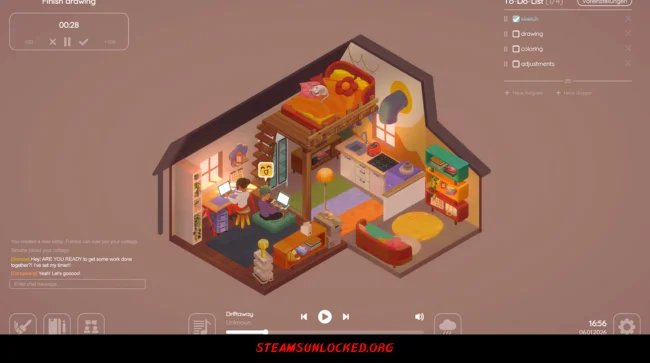
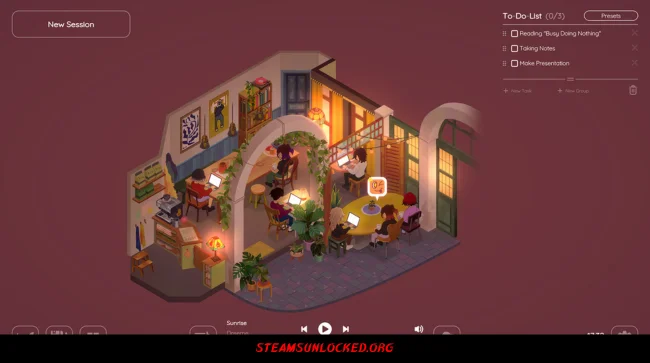
Virtual Cottage 2 is all about creating a calm space where you can actually get things done. Just open the game, jot down your to-do list, and let the soothing music and gentle background sounds drown out everything else. It’s like your own quiet room, tucked away from the chaos.
You can make your cottage feel like your own by decorating it with all sorts of items. Want to study with friends? No problem—the game lets you connect online to share the experience. You can choose where you hang out, whether it’s a cozy cottage or a stylish apartment, and they’re planning to add more spots soon. Oh, and if you love animals, you’re in luck. You can have a cat, a dog, and even a bird living with you—all at once. You may also be interested in the game Bombun.
DOWNLOAD INSTRUCTIONS
- Click the Download button below and you’ll be redirected.
- Wait for 5 seconds and then click the blue ‘download now’ button to start the download.
- Once the download is complete, right-click the .zip file and choose “Extract to”Virtual Cottage 2” (You’ll need 7-Zip, available here).
- Open the game, and run the exe application.
- Enjoy playing! Remember to run the game as an administrator. If you encounter any missing DLL errors, check for a Redist or _CommonRedist folder and install all the programs it contains.
HOW TO FREE DOWNLOAD VIRTUAL COTTAGE 2?
Left-click the download button below to start the free download of Virtual Cottage 2 for PC, getting a direct link. This is the whole game – the full version. Remember to run the game as an administrator.
: NOTICE :
The game is ready to play, no need to install it. If you encounter missing dll errors in the game, find the _Redist or _CommonRedist folder and install DirectX, vcredist, and other programs inside. Check the ‘HOW TO RUN GAME!!.txt’ file for extra help. Always run the game as an administrator to save progress. Disable your antivirus before extracting the game to avoid it removing cracked files.
Are you looking for additional assistance? Check out our FAQ page for answers to common questions and solutions to frequent issues. Click here.
SYSTEM REQUIREMENTS
- OS: Windows 7 (or Higher)
- Processor: Dual-core from Intel or AMD at 2.0 GHz
- Memory: 2 GB RAM
- Graphics: Videocard with at least 512MB
- Storage: 500 MB available space
Screenshots